
JSON-LD Implementation in Single Page Apps
Client-side rendered (CSR) Single Page Applications (SPAs) introduce unique architectural friction for structured data delivery. Because crawlers must execute JavaScript to parse the DOM, JSON-LD payloads injected asynchronously risk missing Google’s rendering window entirely. This guide provides framework-agnostic and framework-specific implementation patterns, step-by-step debugging workflows, and measurable validation steps to ensure reliable schema markup delivery. For broader architectural context, align your injection strategy with established Dynamic Metadata and Structured Data Management workflows.
The CSR Challenge with Structured Data
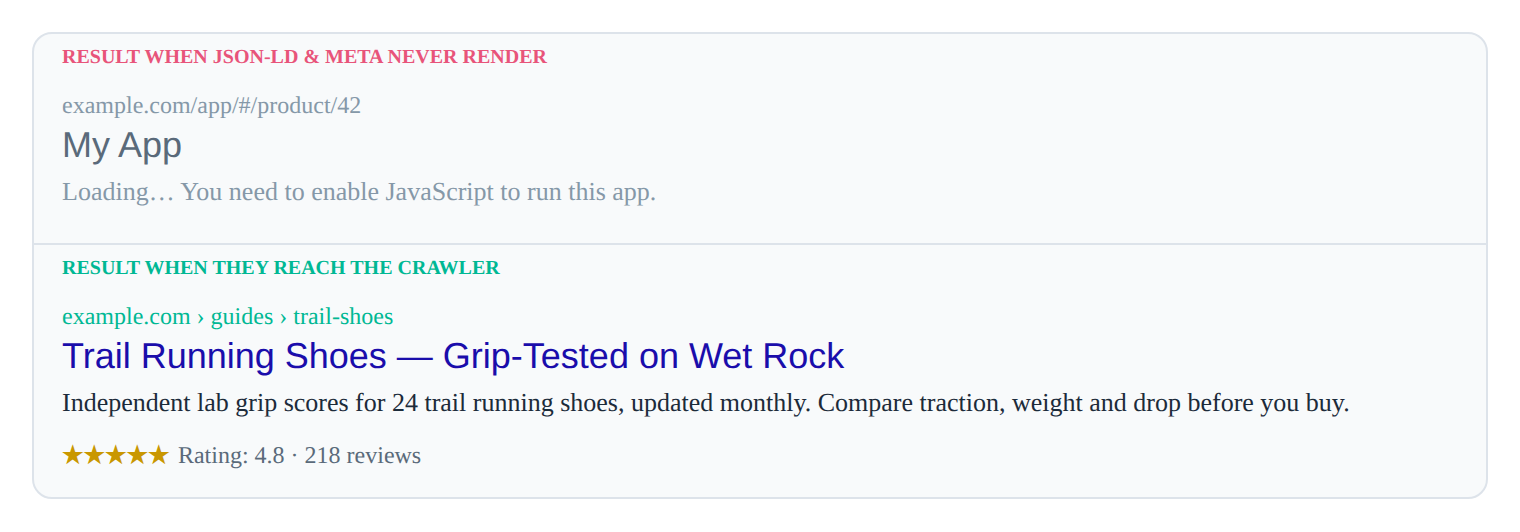
Search engines like Google utilize a two-pass crawling system: an initial HTTP fetch followed by a deferred JavaScript rendering phase. In SPAs, the initial HTML payload typically contains only a root <div id="app">. If JSON-LD is injected after the initial DOM parse or delayed by heavy client-side routing transitions, crawlers may index the page before the structured data materializes.
Client-side routing compounds this issue. When a user navigates via the History API, the URL changes but the document context remains. Without explicit cleanup and re-injection logic, crawlers receive stale or duplicated schema payloads, directly impacting rich snippet eligibility.
Core DOM Injection Patterns
Framework-agnostic DOM manipulation remains the most reliable baseline for JSON-LD injection. The pattern requires creating a <script> element, serializing the payload, and attaching it to the <head>. Crucially, it must include a cleanup routine to prevent tag accumulation during route transitions.
/**
 * Injects JSON-LD into the document head and removes stale instances.
 * @param {Object} schemaData - Valid JSON-LD object
 */
function injectJSONLD(schemaData) {
  const SCRIPT_TYPE = 'application/ld+json';

  // 1. Cleanup: Remove existing JSON-LD scripts to prevent duplication
  const existingScripts = document.querySelectorAll(`script[type="${SCRIPT_TYPE}"]`);
  existingScripts.forEach(script => script.remove());

  // 2. Injection: Create and append new script
  const script = document.createElement('script');
  script.type = SCRIPT_TYPE;
  script.textContent = JSON.stringify(schemaData);
  document.head.appendChild(script);
}
SEO & Rendering Impact: Direct DOM manipulation bypasses framework reconciliation overhead, ensuring the script tag is available to crawlers immediately after execution. Synchronizing this routine with social metadata pipelines, such as Dynamic Open Graph and Twitter Card Injection, guarantees consistent metadata states across all render cycles.
Framework-Aware Workflows
While vanilla DOM injection works, modern frameworks require lifecycle-bound execution to prevent hydration mismatches and memory leaks.
React: useLayoutEffect Timing
React’s useEffect runs asynchronously after paint, which can delay JSON-LD availability. useLayoutEffect executes synchronously after DOM mutations but before the browser paints, reducing the window for crawler misses.
import { useLayoutEffect } from 'react';

export function useJSONLD(schemaData) {
  useLayoutEffect(() => {
    const script = document.createElement('script');
    script.type = 'application/ld+json';
    script.textContent = JSON.stringify(schemaData);
    document.head.appendChild(script);

    return () => {
      // Cleanup on unmount or route change
      script.remove();
    };
  }, [schemaData]);
}
Vue 3: Composition API Composable
Vue’s reactivity system pairs well with composables. For deeper integration patterns, consult Best practices for schema markup in Vue apps.
import { watch, onMounted, onUnmounted } from 'vue';

export function useJSONLD(schemaData) {
  let scriptTag = null;

  const inject = (data) => {
    if (scriptTag) scriptTag.remove();
    scriptTag = document.createElement('script');
    scriptTag.type = 'application/ld+json';
    scriptTag.textContent = JSON.stringify(data);
    document.head.appendChild(scriptTag);
  };

  onMounted(() => inject(schemaData.value));
  watch(schemaData, inject);
  onUnmounted(() => scriptTag?.remove());
}
Angular: Service-Level Directive
Angular’s dependency injection allows centralized schema management. Use DOCUMENT from @angular/common to safely manipulate the DOM across server and client platforms.
import { Injectable, Inject } from '@angular/core';
import { DOCUMENT } from '@angular/common';

@Injectable({ providedIn: 'root' })
export class JsonLdService {
  constructor(@Inject(DOCUMENT) private doc: Document) {}

  inject(schema: Record<string, any>) {
    const existing = this.doc.querySelectorAll('script[type="application/ld+json"]');
    existing.forEach(s => s.remove());

    const script = this.doc.createElement('script');
    script.type = 'application/ld+json';
    script.textContent = JSON.stringify(schema);
    this.doc.head.appendChild(script);
  }
}
SEO & Rendering Impact: Framework-specific lifecycle hooks ensure JSON-LD is injected at the optimal render phase. Cleanup functions prevent DOM bloat and duplicate schema warnings in Google Search Console.
Hydration Timing & Debugging
Hydration mismatches occur when server-rendered HTML differs from client-injected markup. React and Vue will throw console warnings and may discard client-side JSON-LD if injected during the initial hydration pass.
Step-by-Step Debugging Workflow
- Disable JavaScript in DevTools: Verify if JSON-LD exists in the raw HTML response. If absent, confirm SSR/SSG pre-rendering is configured.
- Check Network Timing: Use the Performance tab to measure
DOMContentLoadedvs. script injection. Delays >200ms increase crawler drop-off risk. - Validate Hydration: If using SSR, defer injection to
useEffect(React) oronMounted(Vue) to avoid mismatch errors. Reference Avoiding Metadata Hydration Pitfalls for comprehensive mismatch resolution strategies. - Force
textContentMutation: Instead of replacing nodes, mutate the existing script’s content to bypass hydration diffs.
// Safe hydration-compatible update
function updateJSONLDSafe(schemaData) {
  let script = document.querySelector('script[type="application/ld+json"]');
  if (!script) {
    script = document.createElement('script');
    script.type = 'application/ld+json';
    document.head.appendChild(script);
  }
  // Direct textContent mutation preserves the node, preventing hydration resets
  script.textContent = JSON.stringify(schemaData);
}
SEO & Rendering Impact: Direct textContent mutation preserves the DOM node structure, preventing framework hydration resets that strip structured data. For comprehensive troubleshooting of CSR-specific failures, follow the resolution workflows outlined in Fixing missing JSON-LD after client-side hydration.
Dynamic Data & Real-Time Updates
SPAs frequently load content asynchronously (e.g., infinite scroll, live feeds, paginated lists). JSON-LD must reflect the current viewport state without triggering full page reloads.
State-Driven Schema Updates
Use canonical @id properties to merge or replace schema entities dynamically.
function mergeDynamicSchema(newItems) {
  // Maintain a stable @id for the parent ItemList
  const itemList = {
    "@context": "https://schema.org",
    "@type": "ItemList",
    "@id": `${window.location.origin}${window.location.pathname}#main-list`,
    "itemListElement": newItems.map((item, index) => ({
      "@type": "ListItem",
      "position": index + 1,
      "item": {
        "@type": "Article",
        "name": item.title,
        "url": item.url
      }
    }))
  };
  return itemList;
}
SEO & Rendering Impact: Stable @id values prevent search engines from treating dynamically loaded content as separate, conflicting pages.
Validation, Testing & CI/CD Integration
Manual validation is insufficient for production SPAs. Automate extraction and validation to catch regressions before deployment.
1. Playwright Schema Extraction
// tests/jsonld.spec.js
import { test, expect } from '@playwright/test';

test('validates JSON-LD payload on route', async ({ page }) => {
  await page.goto('/products/widget-x');
  await page.waitForSelector('script[type="application/ld+json"]');

  const jsonLd = await page.evaluate(() => {
    const script = document.querySelector('script[type="application/ld+json"]');
    return script ? JSON.parse(script.textContent) : null;
  });

  expect(jsonLd).not.toBeNull();
  expect(jsonLd['@type']).toBe('Product');
  expect(jsonLd.name).toBe('Widget X');
});
2. Rich Results Test Validation
Paste the live URL into Google’s Rich Results Test. Parse the structured data report for ERROR or WARNING states and resolve before deployment.
3. GSC Coverage Mapping
Use Google Search Console’s URL Inspection tool to verify the “Rendered HTML” tab contains the <script type="application/ld+json"> tag. Cross-reference with the “Enhancements” report to track rich result eligibility over time.
SEO & Rendering Impact: Automated extraction guarantees JSON-LD survives framework updates, dependency upgrades, and routing refactors. CI/CD validation shifts structured data quality assurance left, preventing indexing regressions.
Common Pitfalls
| Pitfall | Symptom | Resolution |
|---|---|---|
Duplicate <script> tags |
GSC “Duplicate JSON-LD” warnings | Implement strict cleanup on route transitions (script.remove()). |
| Invalid JSON syntax | Rich Results Test fails to parse | Use JSON.stringify() with strict validation; avoid trailing commas. |
Missing @context or @type |
Schema.org validation errors | Always include "@context": "https://schema.org" and valid @type values. |
| Late injection (>2s) | Crawler misses payload | Use useLayoutEffect/onMounted; defer heavy data fetching until after initial schema render. |
FAQ
Why does Google Search Console show missing JSON-LD for my SPA?
Crawlers may execute JS before JSON-LD injection completes; implement route-change cleanup and defer injection until DOM ready. Use useLayoutEffect or onMounted to guarantee synchronous availability during the rendering window.
How do I prevent duplicate JSON-LD scripts during client-side routing?
Remove existing <script type="application/ld+json"> tags on route transitions before injecting new payloads. Maintain a single script reference and mutate its textContent instead of appending new nodes.
Can JSON-LD be updated without triggering a full page re-render?
Yes, use direct DOM manipulation targeting the script tag’s textContent to avoid framework hydration mismatches. This preserves the existing DOM tree while updating the structured data payload in place.
In this guide
- Best practices for schema markup in Vue apps — Vue-specific JSON-LD patterns.
- Fixing missing JSON-LD after client-side hydration — recover structured data stripped on hydration.
Related
- Avoiding Metadata Hydration Pitfalls — the broader hydration-safety patterns.
- Programmatic Title and Meta Tag Updates — manage the rest of the head alongside JSON-LD.
- Dynamic Metadata with the Next.js Metadata API — server-render structured data per route.